· 17 min read · Shabir Khan
Architecting a project for the agent era
When coding agents write most of the code, the way you structure a project matters more than ever. Here is how I set up RabtX Starter and Grid, piece by piece, and why each piece is there.
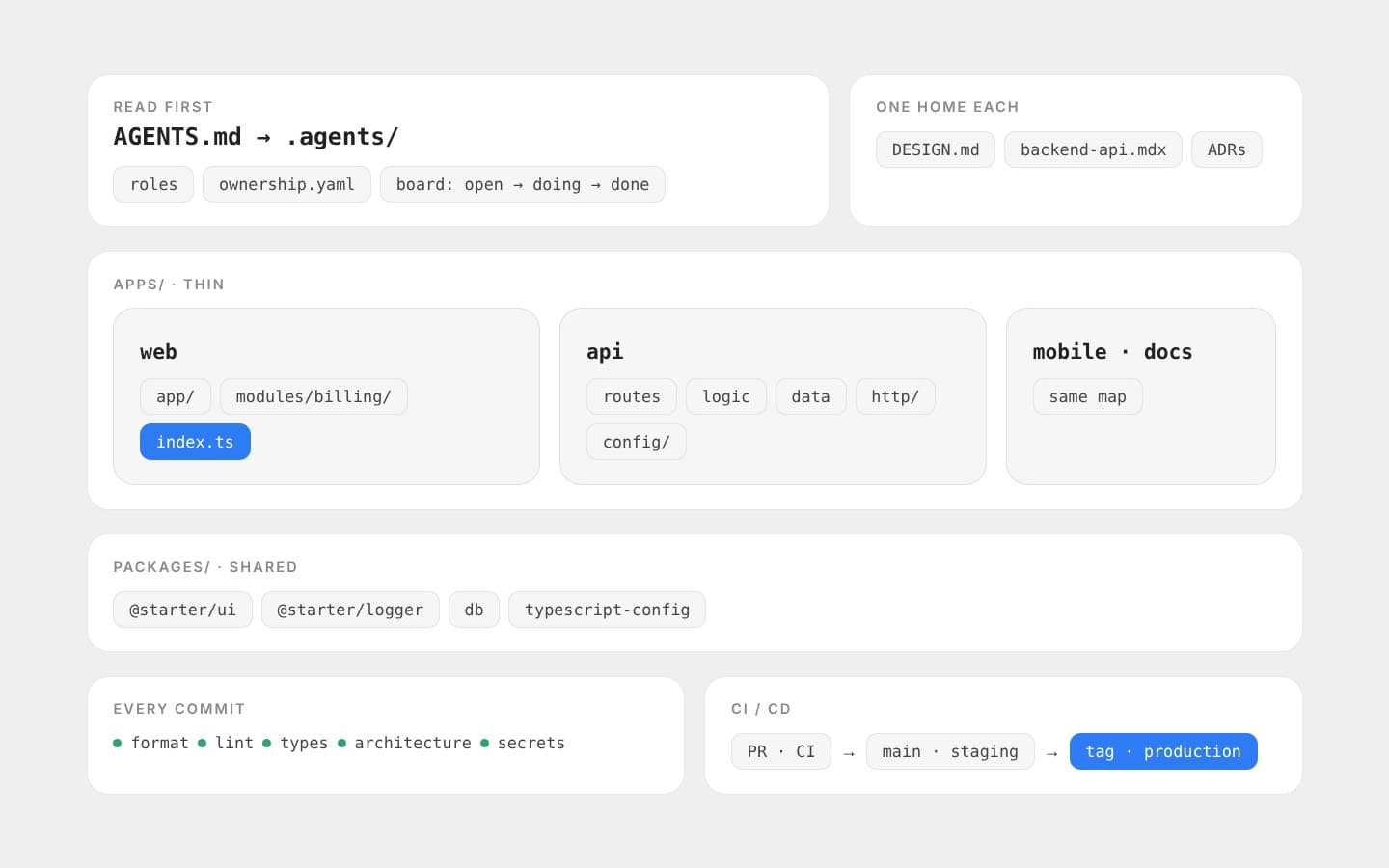
An AI agent does not remember last week's meeting. Every time it starts, it opens the project fresh, reads what it can find, and copies the patterns it sees. If the project is messy, the agent makes more mess, only faster. If the project is clear, the agent follows it. So today, good architecture is not only for people. It is the set of instructions every agent reads before it touches your code.
Every project at RabtX starts from the same monorepo, RabtX Starter, and Grid grew out of it. This post walks through how they are built, one piece at a time. For each piece I will say what it is, why it is there, and what it looks like in the real code.
The big idea
Here is the whole post in three words: clear, bounded, checked.
- Clear: an agent can quickly find where a change belongs.
- Bounded: a change in one place cannot quietly break something somewhere else.
- Checked: when a rule is broken, a machine says so before a person has to.
Everything below is one of those three ideas in practice.
1. Start with domains, not folders
Before any code, I split the product into domains. A domain is one area of the business with its own words and its own rules. In Grid the domains are things like auth, workspaces, projects, billing, notifications and the runner. In School OS they are students, guardians, attendance and messages.
Each domain owns its own rules. For example, Grid's workspace domain says:
- A workspace is the company. It owns projects and billing.
- There are three roles: owner, admin and member.
- A workspace always keeps at least one owner.
- If you are not a member of a workspace, it answers
404, exactly like one that does not exist.
Why this matters for agents: when the rules have one home, an agent working on billing cannot accidentally break how workspaces work. And when you ask an agent to "add a role", it knows exactly which domain to open.
I also start as a modular monolith: one deployable API, split inside into clean domain modules. It is simple to run and simple to debug. If one domain ever needs to become its own service, the boundary is already there, so you can cut along it.
2. One repository for everything
All apps and all shared code live in one monorepo, managed with Bun workspaces and Turborepo:
starter/
├── apps/
│   ├── web/          # Next.js web app
│   ├── mobile/       # Expo app
│   ├── nest-api/     # the API
│   ├── docs/         # the only home for project docs
│   ├── ai-api/       # optional AI service, never public
│   └── rust/         # optional Rust service
├── packages/
│   ├── ui/           # UI pieces every app shares
│   ├── logger/       # one logger for every app
│   └── typescript-config/
├── .agents/          # the agents' handbook: rules, roles, board
├── scripts/          # checks and git hooks
├── AGENTS.md         # "read this first"
└── DESIGN.md         # the design system, in words
The rule is simple: apps stay thin, and shared code goes in packages. An app is its pages, its routes and the parts that truly belong only to it. If two apps need the same thing, it moves into a package and both import it the same way.
Why this matters for agents:
- It sees everything at once. When an agent changes an API endpoint, it can find every screen that calls it, in the same clone.
- One command checks it all. Lint, typecheck and tests run across every app with a single command.
- No copies drift apart. There is one button component, so an agent cannot fix it in one app and forget the other three.
3. How to structure a module
Inside an app, each feature is a module: one folder per feature. Here is a real one, the inbox in Grid's console:
inbox/
├── index.ts                   # the front door
├── components/
│   ├── inbox-screen.tsx
│   └── inbox-screen.test.tsx
├── stores/
│   ├── inbox.ts
│   └── inbox.test.ts
├── services/
│   └── inbox.service.ts       # talks to the API
├── lib/
│   ├── kinds.tsx
│   ├── opened.ts
│   └── opened.test.ts
└── types/
    └── inbox.types.ts
The rules for a module:
- One front door.
index.tslists what other code may use: the screen, the store, the types. Everything else is private to the module. - Same folders every time.
componentsfor UI,storesfor state,servicesfor API calls,libfor small helpers,typesfor types. An agent that has seen one module knows them all. - Tests live next to the code.
opened.tssits besideopened.test.ts, so a change and its test are never far apart. - No reaching inside. Other code imports
@/modules/inbox, never@/modules/inbox/lib/opened.
The app around the modules has its own clear layers too: app/ (or routes/) only for routing and putting pages together, modules/ for features, components/ for shared visual pieces, and lib/ for helpers that do not depend on any framework.
Why the front door matters: it gives an agent a map. To use a feature, read its index.ts. To change a feature, stay inside its folder. And because nothing outside depends on a module's insides, you can refactor them freely.
4. The same layers in every API
The API follows one shape, whatever the framework:
- Routes at the top. They read the request, check the input, call the logic and send the reply. They stay thin.
- Logic in the middle. This is where the domain rules live, as plain functions or services.
- Data at the bottom. Only this layer talks to the database.
Things every request needs, like errors, input validation, the sign-in check, rate limits and request ids, live in their own shared folder.
In Starter's NestJS API, each domain module has a users.module.ts, users.service.ts, users.repository.ts and users.types.ts. Shared HTTP pieces sit in src/common/ and settings in src/config/.
Grid later moved from NestJS to Hono on Bun, and the shape did not change. Each module has a routes.ts, its input schemas, plain functions for logic and queries, and tests beside them. Shared pieces moved to src/http/, and the database schema and migrations moved to a shared packages/db.
Why this matters: you could swap the whole framework and keep the map. An agent that learned where things go in one project already knows where they go in the next.
5. The API contract: one page, and tests that prove it
The contract is the promise the API makes to everyone who calls it: the web app, the mobile app, the runner, other agents. In Grid, it lives on one page in the docs, backend-api.mdx. For every endpoint it lists the method, path, who may call it, and what goes in and out.
The rules around it:
- Callers read it first. Before a web agent uses an endpoint, it reads the contract, not the API's code.
- Change the code, change the contract, in the same commit. If a backend agent changes a public endpoint, it updates the page in the same change.
- Every change goes in a changelog, with the date and whether it breaks anything. For example: "Signup needs an invite token unless the owner opens signup. Breaking: yes."
A page can still lie, so the contract is also tested. Grid has a contract test suite that does not look at the code at all. It starts a real API with its own fresh database and calls it over HTTP, like a real client would, checking every response the apps depend on. When Grid moved from NestJS to Hono, this suite is what proved nothing broke for the people using the API.
There is a small story in that suite too. It once pointed at the developer's everyday API by default, and it filled that database with test accounts. Now it refuses to run unless you name a throwaway API on purpose. Good architecture is full of small rules like that, each one learned from a real mistake.
6. The agent board: how work gets assigned
Agents do not just "start coding". Every change starts as a card on a board, and the board is plain Markdown files in the repo:
board/
├── open/     # raised, waiting for someone
├── doing/    # claimed and in progress
└── done/     # finished, kept forever as history
A card says exactly what to build and where. Here is the top of a real Grid card:
title: Toasts for action feedback, and a faster new-task flow
from: ui-ux
to: web
assignee: codex
reviewer: claude
branch: agent/web/console-toasts
worktree: ../grid-worktrees/agent/web/console-toasts
scope:
  - apps/console/src/ui/toast.tsx
  - apps/console/src/ui/toast.test.tsx
  - apps/console/src/modules/projects/components/new-task-dialog.tsx
Here is what each part means, and why it is there:
- Roles. Every agent works as one role: backend, web, UI/UX, QA, reviewer or PM. Each role has a short charter saying what it owns and what it must not touch.
- Ownership map.
.agents/ownership.yamllists which folders each role may change. The default is "deny": if a path is not yours, you do not write to it. Reading is open to everyone. - Scope. The card lists the exact files the change may touch. It can be narrower than the role, never wider. If the agent finds a problem outside its scope, it raises a new card for the owner instead of fixing it on the side.
- A branch and a worktree per card. Each card gets its own branch, like
agent/web/console-toasts, and its own copy of the repo on disk. Two agents never edit the same checkout, so they cannot step on each other. - A different reviewer. The agent that wrote the code never reviews it.
- Evidence, not "done". Before a card closes, the agent records which files changed, which checks it ran and their real results, whether the contract changed, and the commit. "It works on my machine" is not evidence.
The contract for agents even sorts mistakes by how serious they are. A genuine blocker reported honestly is fine. Missing evidence must be fixed before merge. Editing outside the scope means the work comes back. Claiming tests passed when they did not, or committing a secret, removes that agent's right to merge.
Why all this: most bad agent work I have seen is not bad code. It is drive-by changes: a refactor nobody asked for, a file reformatted, a test quietly loosened. A clear scope and a different reviewer stop that before it starts.
7. Skills: teach agents once, not every time
A skill is a short guide an agent loads when it starts a certain kind of job. It is a folder with a SKILL.md file inside. At the top, a name and a description say when to use it. Below that come the instructions: the rules, the right patterns, the mistakes to avoid and where the real source of truth lives.
name: solid-2
description: >-
  Use for any code in apps/console or any other Solid code in Grid. Grid runs Solid 2.
  Lists the Solid 1.x APIs that are removed or deprecated and their 2.0 replacements,
  plus the idioms to follow.
Why skills exist: an AI model's training data is always a little out of date, and it knows nothing about your project's own rules. Grid's console runs Solid 2, but most of what models learned describes Solid 1. Without help, an agent writes old code that looks right and does not work. The solid-2 skill lists every removed API, its replacement, and tells the agent to trust the installed type definitions over its memory. One file fixes that mistake for every agent, forever.
All skills live in one place, .agents/skills/, and there are two kinds:
- Our own skills are project rules, and every agent doing that kind of work must follow them. In Grid there are three:
solid-2for any console code,mobile-firstfor any UI (phone layout first, then desktop on top, in one component), andbrowser-ui-testfor checking interactive UI in a real browser. - Vendored skills are copied from other projects for good advice: shadcn components, NestJS best practices, Rust guidelines and more. They are installed with
bunx skills add <repo> --skill <name>, andskills-lock.jsonpins each one to its source and a content hash, so nobody can change them quietly. Agents read them for guidance, but they are not project policy.
AGENTS.md points to the skills that matter ("read the solid-2 skill before any Solid work"), and the agent loads them only when the job needs them. That keeps every agent's context small and focused.
Tips for writing good skills:
- Make the description say when to use it, with the words an agent will see in the task: file paths, library names, keywords.
- Point to the real source of truth, like the installed typings or the official changelog, instead of copying docs that will go stale.
- One skill per job. A short, focused skill gets followed. A long one gets skimmed.
- Turn repeated review comments into skills. If you correct agents about the same thing twice, write it down once.
8. The checks on every commit, and why
Every commit runs a set of checks first, using git hooks (Lefthook). If any check fails, the commit does not happen. Here is each one, and the reason it exists:
| Check | What it does | Why |
|---|---|---|
| Trailing whitespace | Removes stray spaces at line ends | Keeps diffs clean, so reviews show real changes only |
| Format | Formats every file (oxfmt, shfmt and others) | Nobody argues about style, and agents cannot make "format-only" noise |
| Lint | Runs oxlint and fixes what it can | Catches bugs and bad patterns while they are cheap to fix |
| Typecheck | Runs TypeScript across every app | A type error in one package breaks every app that uses it |
| Architecture check | Blocks deep imports and bad cross-app imports, and checks file names | Keeps the module "front doors" and boundaries real, not just written down |
| Large files | Refuses any file over 2 MB | Stops build output, videos or dumps from bloating the repo forever |
| Secret scan | Looks for private keys, API keys, passwords and tokens in what you added | A secret in git history is very hard to remove, so stop it at the door |
| Commit message | Requires Conventional Commits, like feat(auth): add passkey login | Clear history for humans, and changelogs that can be generated |
The architecture check is just a few searches that must come back empty:
# Outside a module, import its front door only, never its insides.
rg -n 'from\s+"@/modules/[^"]+/[^"]+/[^"]+"' apps/web/src/app apps/web/src/components apps/web/src/lib

# Shared packages never import an app's own '@/...' code.
rg -n 'from\s+"@/' packages

# Apps never reach into each other with relative paths.
rg -n '\.\./\.\./apps/' apps
The naming check makes every file and folder kebab-case, like billing-page.tsx, while still allowing names frameworks need, like auth.service.ts, (auth) and [id].
Before pushing, there is one more command: bun run preflight, which runs lint, typecheck and tests together.
Why run checks on every commit, not just in CI? Speed. An agent that breaks a rule hears about it in seconds, with the exact file and line, and fixes it right away. Without the hook it finds out ten minutes later in CI, or a day later in review, when it has long moved on.
9. CI: every pull request proves itself
Nothing goes into main directly. Every pull request runs the full CI pipeline on GitHub Actions:
- Lint the whole repo, including shell scripts.
- Typecheck every app and package.
- Build every app, so we know it really compiles for production.
- Test. Unit tests run against a real Postgres database, with migrations applied first.
- API contract. A fresh Postgres is migrated and seeded, the real API starts, CI waits until its health check answers, then the contract suite runs against it.
- End-to-end. Playwright opens the web app in a real browser and clicks through it.
A separate security workflow runs on every pull request too: dependency review flags risky new packages, and CodeQL scans the code for security problems.
Two small settings make a big difference. CI installs with a frozen lockfile, so it uses exactly the package versions you tested. And when you push again, the older run is cancelled, so you never wait on a result that no longer matters.
Why this matters for agents: CI is the referee nobody can argue with. An agent cannot say "it works" when the build is red. And because CI is the same for every agent and every human, the bar is the same for everyone.
10. CD: shipping without heroics
Deploying follows the same idea: make it automatic, make it boring, and make it easy to check. Starter ships this pipeline with the deploy steps left for each project to fill in; Grid fills them in like this:
- Every merge to
maingoes to staging. First the same quality gate runs again (preflight, plus the Rust checks). Then the API deploys to staging on Render, pinned to that exact commit. Then the pipeline waits for the health check. If staging is not healthy within ten minutes, the deploy fails loudly. - Production only ships from a version tag, like
v0.2.0. Same gate, same deploy, same health check, but on purpose and never by accident. - The web app and docs deploy through their Vercel projects, and the database runs on Neon.
- Secrets live in GitHub environments (
stagingandproduction), never in the repo. If a deploy secret is missing, the job stops and says which one.
Why tags for production? Because a merge is "this code is ready", while a release is "we choose to ship this now". Keeping those two decisions apart means an agent's merged pull request can never reach your users on its own.
11. Check the settings once, at startup
Settings (environment variables) are one of the most common ways a working change breaks in production, and agents add new ones freely. So every setting is checked against a schema once, when the app starts:
export const envSchema = z
	.object({
		NODE_ENV: z.enum(['development', 'test', 'production']).default('development'),
		PORT: z.coerce.number().int().positive().default(4000),
		DATABASE_URL: z.url().default('postgresql://starter:starter@localhost:5433/starter'),
		DATABASE_POOL_MAX: z.coerce.number().int().min(1).max(50).default(10),
		JWT_SECRET: z.string().min(32).default(developmentJwtSecret),
		SESSION_TTL_DAYS: z.coerce.number().int().min(1).max(365).default(30),
		// …
	})
The rest of the app reads typed settings through one config service. A missing or wrong value stops the app at startup with a clear message, instead of turning into a strange bug three requests later. And when an agent needs a new setting, there is exactly one place to add it.
12. One home for every truth
Nothing confuses an agent faster than two documents that disagree. So each kind of truth has exactly one home, and everything else links to it:
| Truth | Its one home |
|---|---|
| How to work in the repo | AGENTS.md, then .agents/ |
| Who may change which folders | .agents/ownership.yaml |
| The design system | DESIGN.md |
| The API contract | backend-api.mdx in the docs app |
| Project docs | the docs app (there is no loose docs/ folder) |
| Big decisions and why | decision records under /docs/architecture |
If a document and the code disagree, that is a bug, and it gets fixed the same day. The next agent will believe whichever one it reads first.
13. Strong defaults, with a way out
None of this is meant to be a cage. Starter's very first architecture decision says it plainly: strong defaults, enforced by checks, with a written way to override them. If a project needs to break a rule, it writes down why in /docs/overrides. A project can also add its own, stricter rules on top.
That is how one starter became very different products. Grid swapped the API framework and added a Solid console, but kept the same layers, the same checks and the same .agents/ handbook. School OS runs the same Next.js, Expo and NestJS stack. The map stays the same, so an agent or a person can move between projects without learning everything again.
A checklist you can steal
- Split the product into domains, and give each domain's rules one home.
- One monorepo. Thin apps, shared packages.
- Every module has one front door (
index.ts) and the same folders inside. - Tests sit next to the code they test.
- APIs use the same layers: routes, logic, data.
- One contract page, updated in the same commit as the code, with a changelog.
- Contract tests that call the real API over HTTP.
- A board of cards with roles, an ownership map, a narrow scope and a different reviewer.
- One branch and one worktree per card.
- Skills for the jobs agents get wrong, with the project's own skills kept apart from vendored ones.
- Checks on every commit: format, lint, typecheck, architecture, large files, secrets, commit message.
- CI on every pull request: lint, typecheck, build, tests, contract, end-to-end, security.
- Staging on every merge, production only on a tag, with health checks after both.
- Settings checked once, at startup.
- A written way to break the rules on purpose.
Closing
AI agents made code cheap to write and hard to trust. Architecture is how you win the trust back. Give agents a project they can read, boundaries they cannot cross by accident, and checks that tell them the moment they slip. Build that once, in a starter, and every project after it begins already knowing where everything goes.